


Description
Payment & Security

Your payment information is processed securely. We do not store credit card details nor have access to your credit card information.
Great Prices Everyday
Australian Family Owned
Need help?



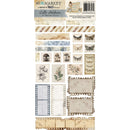
A beautifully nostalgic set of die-cut cello stickers from the Faded Memory Lane collection by 49 and Market, a collaboration between Nuneka and AHW. With 81 die-cut pieces, this set is packed with vintage-inspired elements that bring a timeless, aged aesthetic to any project. 📜
Item #: FML-35711
Collection: Faded Memory Lane
Designers: Nuneka & AHW
Includes: 81 die-cut pieces
Type: Cello Stickers
Made in: China
The sheet is filled with a wonderful mix of tape strips and decorative stickers:
🎞️ Film strip stickers — multiple sizes including full-width strips and individual film frames in aged blue, cream and sepia tones
🦋 Moth & butterfly stamps — vintage entomology-style postage stamp stickers featuring detailed moths and butterflies
🍄 Mushroom stamps — botanical illustration stamps with single and grouped mushrooms on aged paper
🌿 Botanical illustrations — hand-drawn style poppies, wildflowers and foliage on cream and linen backgrounds
🖊️ Tape strip stickers — a large variety of torn and straight tape pieces in textures including aged script, music sheets, watercolour washes, newspaper print, linen, vintage documents, bubble textures, damask patterns and diagonal stripes
📅 Ephemera details — pieces featuring vintage text such as "June 1888", "Received", "This Ticket" and handwritten script
A muted, antique palette — warm sepia, tan, aged cream, dusty blue, soft grey, taupe and faded mauve. Everything has a worn, time-worn quality that's perfect for heritage and memory-themed projects.
Junk journaling, scrapbooking, memory keeping, vintage-style card making, mixed media, altered art and heritage album projects.
Your payment information is processed securely. We do not store credit card details nor have access to your credit card information.

You have copied the placement for the Product Page.
Go back to the App Embeds section, and in the Paypal Advanced Settings, paste the copied value into the Product Page field and click the 'Save' button in the top right corner.