


Description
Payment & Security

Your payment information is processed securely. We do not store credit card details nor have access to your credit card information.
Great Prices Everyday
Australian Family Owned
Need help?



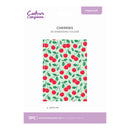
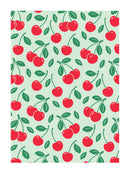
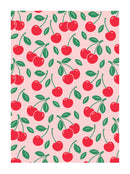
Add sweet texture and charming detail to your papercraft projects with the Cherries 3D Embossing Folder from the Nature's Garden Berry Bliss collection. Featuring an all-over cherry pattern inspired by summer fruit gardens, this embossing folder creates beautifully raised designs that bring depth, dimension, and visual interest to cards, scrapbook layouts, gift packaging, and mixed media projects.
Engineered to produce crisp, high-definition embossed impressions, the 3D design creates deeper texture than standard embossing folders, making every detail stand out. Perfect for creating eye-catching backgrounds, seasonal projects, and fruit-themed crafts, this versatile folder coordinates beautifully with other Berry Bliss collection products (Sold Separately) for cohesive and professionally finished designs.
Key Features
1-piece 3D embossing folder
Features an all-over cherry pattern
Creates deep, dimensional embossed effects
Ideal for cardmaking, scrapbooking, journalling, gift tags, and papercraft projects
Produces detailed, high-definition texture and background designs
Embossing folder size: 12.7 x 17.8 cm (5" x 7")
Suitable for seasonal, floral, fruit-themed, and summer-inspired projects
Part of the Nature's Garden Berry Bliss Collection
Coordinates with other Berry Bliss products (Sold Separately)
Bring a fresh and playful touch to your handmade creations with the Cherries 3D Embossing Folder. Whether used as a striking background or a subtle textured accent, this versatile embossing folder adds depth, character, and summer-inspired charm to every project.
Your payment information is processed securely. We do not store credit card details nor have access to your credit card information.

You have copied the placement for the Product Page.
Go back to the App Embeds section, and in the Paypal Advanced Settings, paste the copied value into the Product Page field and click the 'Save' button in the top right corner.