
Description
Payment & Security

Your payment information is processed securely. We do not store credit card details nor have access to your credit card information.
Great Prices Everyday
Australian Family Owned
Need help?



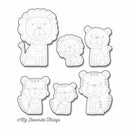
This Die-namics coordinating die set will help you get the most out of your stamping projects. This product works perfectly with the popular Lions and Tigers stamp set, so you can be sure that your die cuts will always be the right size. This gives your projects a professional and polished look. This new die makes it easy to stamp and then cut or cut and then stamp, no matter which way you like to do it. The die is light and easy to handle because of its open design. This makes it easier to stamp and cut accurately and reduces strain during long crafting sessions.
Think of all the things you could do: layered cards, custom decorations, and one-of-a-kind paper crafts, all of which are easy to make and very accurate. The flexible construction makes it easy to remove your designs, so your projects stay intact without any trouble. This die set is great for hobbyists, crafters, and DIYers who want to take their paper crafting to the next level. It combines ease of use with creativity.
Don't settle for regular die cuts. Get a tool that is designed for accuracy, ease of use, and endless creative possibilities. Add this coordinating die to your crafting tools and see why crafters all over the world are talking about how well it works.
This 6 piece set includes: Lions (3) measuring 1 5/8' x 2 1/4' 1 1/8' x 1 5/8' 1 1/8' x 1 1/4' Tigers (3) measuring 1 3/8' x 1 3/4' 1 1/4' x 1 1/2' 1 1/8' x 1 1/ Lions (3) measuring 1 ' x 2 1/8' 1' x 1 ' 1' x 1 1/8' Tigers (3) measuring 1 ' x 1 5/8' 1 1/8' x 1 3/8' 1' x 1 1/8'. MFT Die-namics dies are our very own EXCLUSIVE American made line of steel dies. Die-namics dies work with most tabletop die-cutting machines, such as the Big Shot and Cuttlebug. Samples courtesy of MFT
Your payment information is processed securely. We do not store credit card details nor have access to your credit card information.

You have copied the placement for the Product Page.
Go back to the App Embeds section, and in the Paypal Advanced Settings, paste the copied value into the Product Page field and click the 'Save' button in the top right corner.