

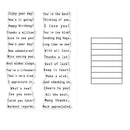

Description
Payment & Security

Your payment information is processed securely. We do not store credit card details nor have access to your credit card information.
Great Prices Everyday
Australian Family Owned
Need help?



Create stylish everyday cards and personalised papercraft projects with the Poppy Crafts Cutting Dies & Stamp Set #242. This versatile coordinating set features a collection of short greeting sentiments with matching label-style dies, perfect for adding clean layered messages to handmade cards, scrapbook layouts, journals, planners and gift tags.
Designed for quick and creative crafting, the detailed sentiment stamps produce crisp impressions while the coordinating dies cut neat rectangular labels for professional-looking finishes. Ideal for use with inks, embossing powders, markers and mixed media techniques, this set is perfect for birthdays, thank you cards, friendship greetings and everyday paper craft projects. Compatible with most leading die-cutting machines (Sold Separately). Approximate stamp set size: 15 x 20 cm. Approximate cutting die size: 6.7 x 9.9 cm.
Key Features:
Coordinating everyday sentiment stamps and cutting dies
Features versatile greetings for multiple occasions
Ideal for card making, journaling, scrapbooking and planners
Produces crisp stamped sentiments and clean label die cuts
Suitable for inks, embossing powders, markers and pencils
Compatible with most leading die-cutting machines (Sold Separately)
Stamp set size approximately 15 x 20 cm
Cutting die size approximately 6.7 x 9.9 cm
Add polished sentiment labels and thoughtful finishing touches to your handmade creations with the Poppy Crafts Cutting Dies & Stamp Set #242, a practical addition to any papercraft collection.
Your payment information is processed securely. We do not store credit card details nor have access to your credit card information.

You have copied the placement for the Product Page.
Go back to the App Embeds section, and in the Paypal Advanced Settings, paste the copied value into the Product Page field and click the 'Save' button in the top right corner.