




Description
Payment & Security

Your payment information is processed securely. We do not store credit card details nor have access to your credit card information.
Great Prices Everyday
Australian Family Owned
Need help?



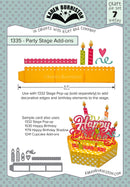
Karen Burniston Dies 1335 – Party Stage Add-Ons 🎉 is a versatile wafer-thin metal die set designed to expand and enhance your interactive cardmaking and paper crafting projects. Created by renowned designer Karen Burniston, this set allows crafters to add extra decorative elements to scene-building designs, especially those featuring stage, celebration or party themes.
The Party Stage Add-Ons die set is perfect for adding fun details to cards celebrating birthdays, anniversaries, graduations, performances and other joyful occasions. These dies are designed to work beautifully on their own or alongside other Karen Burniston interactive dies, allowing you to create dimensional scenes, layered decorations and playful compositions.
Whether you are crafting a theatre-inspired pop-up card, decorating a scrapbook page, or designing a unique handmade invitation, these dies provide the creative flexibility needed to bring your ideas to life. The finely detailed shapes cut cleanly through cardstock, patterned paper and other common crafting materials, ensuring professional-looking results every time.
Made from high-quality wafer-thin metal, the dies are compatible with most major die-cutting machines used by paper crafters around the world. Their precise cutting edges allow you to achieve crisp cuts and detailed designs, making them a reliable addition to any craft collection.
This die set is a wonderful choice for crafters who love building scenes and adding dimensional details to their projects. Combine it with stamps, embossing folders and patterned papers to create eye-catching handmade cards and memorable paper creations. ✂️🎨
Your payment information is processed securely. We do not store credit card details nor have access to your credit card information.

You have copied the placement for the Product Page.
Go back to the App Embeds section, and in the Paypal Advanced Settings, paste the copied value into the Product Page field and click the 'Save' button in the top right corner.