

Description
Payment & Security

Your payment information is processed securely. We do not store credit card details nor have access to your credit card information.
Great Prices Everyday
Australian Family Owned
Need help?



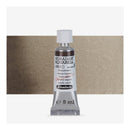
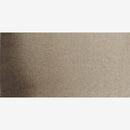
Experience the timeless character of Schmincke Horadam Aquarell Watercolour Paint - Sepia Brown (Colour No. 663, Series 1), a semi-opaque, deep neutral brown that delivers classic sophistication and versatility. Once derived from the ink of the cuttlefish, Sepia has evolved into a modern, lightfast pigment blend combining Phthalocyanine Blue (PB15:1), Natural Earth Pigment (PBr7), and Carbon Black (PBk9). The result is a rich, cool-toned brown ideal for creating shadows, underpaintings, and expressive monochrome studies.
Sepia Brown is a foundational colour for landscape, portrait, and ink-style watercolour work, prized for its ability to establish tonal structure and atmosphere. Often used for first washes or base layers, it produces natural warmth when diluted and deep, dramatic depth when concentrated. Its smooth handling, subtle opacity, and controlled flow make it perfect for glazing and soft blending.
Each Schmincke Horadam Aquarell paint is crafted with premium Kordofan Gum Arabic from the southern Sahara, carefully tested to ensure exceptional flow, easy rewetting, and lasting brilliance. Even when dry, the paint reactivates effortlessly, maintaining consistent pigment strength and smooth application across every layer.
With over 150 professional shades available in 5ml, 15ml, Half Pan, and Full Pan formats (sold separately), and 95 single-pigment hues for pure, harmonious mixing, Schmincke Horadam Aquarell continues to define the pinnacle of watercolour excellence.
Sepia Brown (Series 1) is a semi-opaque, lightfast deep brown neutral a modern reinterpretation of the historic sepia tone, perfect for grounding compositions, building depth, and creating timeless tonal studies in professional watercolour art.
Your payment information is processed securely. We do not store credit card details nor have access to your credit card information.

You have copied the placement for the Product Page.
Go back to the App Embeds section, and in the Paypal Advanced Settings, paste the copied value into the Product Page field and click the 'Save' button in the top right corner.