




Description
Payment & Security

Your payment information is processed securely. We do not store credit card details nor have access to your credit card information.
Great Prices Everyday
Australian Family Owned
Need help?



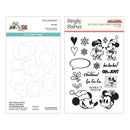
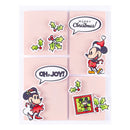
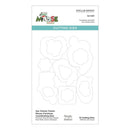
Bring holiday magic to your craft projects with the Say Cheese Classic Mouse Christmas Stamp & Die Bundle from Simple Stories. This complete set includes both the SS25216 Say Cheese Classic Mouse Christmas Clear Stamp Set and the S4-1497 Coordinating Dies, giving you everything you need to stamp, cut, and embellish with ease.
The 19 clear stamps feature beloved mouse friends dressed in festive attire, paired with seasonal accents such as holly berries, mistletoe, and snowflakes. Five holiday sentiments Merry Christmas, Ho Ho Ho, Fa La La, Make it Merry, and Oh, Joy! add the perfect finishing touch to your cards, scrapbook pages, and seasonal décor.
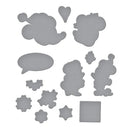
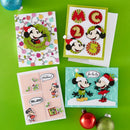
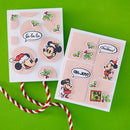
Cut each stamped design with the coordinating dies to achieve crisp, professional results every time. Together, these high-quality stamps and thin metal dies provide endless creative opportunities for Christmas crafting.
Part of an exclusive collaboration with Simple Stories, this bundle coordinates beautifully with the Say Cheese Classic Mouse Christmas Collection of papers, embellishments, and more (sold separately).
Approximate Die Sizes (S4-1497 Coordinating Dies):
Male Head: 2.13 x 1.45 in. / 5.40 x 3.70 cm
Female Head: 1.46 x 1.49 in. / 3.70 x 3.80 cm
Speech Bubble: 1.58 x 0.94 in. / 4.00 x 2.40 cm
Mistletoe: 0.47 x 0.59 in. / 1.20 x 1.50 cm
Female Mouse: 1.08 x 1.60 in. / 2.70 x 4.10 cm
Male Mouse: 1.12 x 1.88 in. / 2.80 x 4.80 cm
Small Holly: 0.75 x 0.50 in. / 1.90 x 1.30 cm
Large Holly: 0.90 x 0.85 in. / 2.30 x 2.20 cm
Small Snowflake: 0.56 x 0.61 in. / 1.40 x 1.50 cm
Medium Snowflake: 0.59 x 0.67 in. / 1.50 x 1.70 cm
Large Snowflake: 0.70 x 0.74 in. / 1.80 x 1.90 cm
Postage Stamp: 0.94 x 0.94 in. / 2.40 x 2.40 cm
Your payment information is processed securely. We do not store credit card details nor have access to your credit card information.

You have copied the placement for the Product Page.
Go back to the App Embeds section, and in the Paypal Advanced Settings, paste the copied value into the Product Page field and click the 'Save' button in the top right corner.