


Description
Payment & Security

Your payment information is processed securely. We do not store credit card details nor have access to your credit card information.
Great Prices Everyday
Australian Family Owned
Need help?



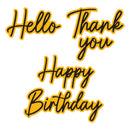
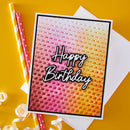
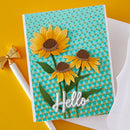
Spellbinders Etched Dies - Big & Bold Sentiments by Simon Hurley includes 10 thin metal cutting dies designed to create large script-style sentiments with coordinating shadow layers for added dimension and impact. Featuring popular greetings including “Hello”, “Thank You”, and “Happy Birthday”, this versatile die set creates eye-catching focal points perfect for modern handmade cards and paper craft projects.
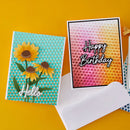
Perfect for cardmaking, scrapbooking, journalling, and mixed media projects, these bold sentiment dies can be layered for dimensional effects or used individually for clean contemporary designs. Designed to coordinate beautifully with the Cascading Coneflowers Collection and other background and floral designs (Sold Separately), this set adds stylish typography and professional finishing touches to handmade creations.
Key Features:
Includes 10 thin metal cutting dies
Features large script-style sentiments with shadow layers
Includes greetings such as Hello, Thank You, and Happy Birthday
Ideal for cardmaking, scrapbooking, journalling, and mixed media
Creates bold focal points with layered dimensional detail
Coordinates with the Cascading Coneflowers Collection (Sold Separately)
Designed by Simon Hurley for Spellbinders
Approximate Size:
Hello with Shadow: 4.8 x 2.8 cm
Thank with Shadow: 5.0 x 2.7 cm
You with Shadow: 3.3 x 2.2 cm
Happy with Shadow: 5.0 x 3.0 cm
Birthday with Shadow: 6.9 x 3.0 cm
Create stylish handmade cards and paper craft projects with bold dimensional sentiments and modern script detail using this versatile Big & Bold Sentiments die set from Spellbinders.
Your payment information is processed securely. We do not store credit card details nor have access to your credit card information.

You have copied the placement for the Product Page.
Go back to the App Embeds section, and in the Paypal Advanced Settings, paste the copied value into the Product Page field and click the 'Save' button in the top right corner.