




Description
Payment & Security

Your payment information is processed securely. We do not store credit card details nor have access to your credit card information.
Great Prices Everyday
Australian Family Owned
Need help?



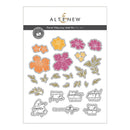
Transform your paper crafting projects with the Floral Odyssey Add-On Die Set, the ultimate accessory for crafters who love dimensional elegance. Perfect for scrapbooking, cardmaking, journaling, and creative paper projects, this versatile die set brings radiant florals and refined details to life.
Featuring 25 high-quality coordinating dies, including four exquisitely shaped flowers in multiple sizes, this set allows you to craft layered floral arrangements or create sophisticated focal points for your handmade designs. Each die is designed to work seamlessly with the Floral Odyssey Stamp Set and other components from the Craft Your Life Project Kit, ensuring cohesive, professional-looking results every time.
Whether you’re a beginner or an experienced crafter, these dies give you creative freedom to explore unique textures, intricate layers, and artistic details that elevate any project. Use them to add charm, elegance, and a personal touch to greeting cards, journals, scrapbooks, and more.
Unlock endless possibilities in paper crafting and bring your floral visions to life with the Floral Odyssey crafting dies—a must-have for anyone seeking premium, easy-to-use tools that inspire creativity and standout designs.
Die Dimensions:
Die-Cut with Confidence!
Crafted for precision, Altenew dies are compatible with most standard die-cutting machines and designed for effortless alignment with our stamp images. Whether you're embellishing travel journals or personalising heartfelt cards, you’ll achieve crisp, clean cuts every time - adding instant impact and dimension to your creative projects.
Complete your collection with the Floral Odyssey Add-On Die Set and experience limitless possibilities in one stylish, coordinated set.
Your payment information is processed securely. We do not store credit card details nor have access to your credit card information.

You have copied the placement for the Product Page.
Go back to the App Embeds section, and in the Paypal Advanced Settings, paste the copied value into the Product Page field and click the 'Save' button in the top right corner.