




Description
Payment & Security

Your payment information is processed securely. We do not store credit card details nor have access to your credit card information.
Great Prices Everyday
Australian Family Owned
Need help?



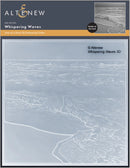
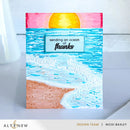
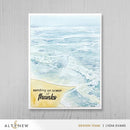
Capture the tranquil beauty of the coast with the Altenew Whispering Waves 3D Embossing Folder. Featuring softly rolling ocean waves meeting the shoreline, this beautifully detailed design creates realistic texture and dimension that instantly elevates handmade cards, scrapbook layouts, journal pages and mixed media projects. Perfect for beach-inspired creations, nautical themes and coastal papercrafting, it delivers stunning depth with minimal effort.
Designed to produce sculpted, multi-level impressions in a single pass, this premium 3D embossing folder transforms ordinary cardstock into striking dimensional backgrounds. Use it as a focal feature or combine it with coordinating seaside elements to create elegant, layered designs filled with movement and natural charm.
Key Features:
Creates a realistic shoreline and rolling wave design with deep 3D texture
Produces detailed, multi-level embossed impressions in one pass
Ideal for cardmaking, scrapbooking, journaling and mixed media projects
Adds depth, movement and dimension to coastal and nautical themes
Compatible with most standard die-cutting and embossing machines
Perfect for backgrounds, focal panels and layered papercraft designs
Perfect Pairings: Caribbean Life Layering Stencil Set (Sold Separately), Caribbean Dreams Die Set (Sold Separately), Mini Seashells Stamp Set (Sold Separately)
Bring the calming beauty of the ocean to your creative projects with the Altenew Whispering Waves 3D Embossing Folder. A versatile addition to any papercrafting collection, it makes it easy to create professional-looking dimensional backgrounds that leave a lasting impression.
Your payment information is processed securely. We do not store credit card details nor have access to your credit card information.

You have copied the placement for the Product Page.
Go back to the App Embeds section, and in the Paypal Advanced Settings, paste the copied value into the Product Page field and click the 'Save' button in the top right corner.